


Have you ever wished to add the perfect sounds to your video without extensive research, recording, or editing? Well, an AI sound effect generator makes it possible!
Sound effects can elevate your video’s impact, but creating them can be challenging. An AI sound generator simplifies this process, helping you achieve a polished finish with just a few clicks. This guide explores Filmora’s advanced AI sound generation tools and offers tips for selecting the best one for your needs. Let’s dive in!
Part 1. How Does an AI Sound Effect Generator Work?
AI sound effect generators like Filmora use machine learning to generate realistic sound effects. These algorithms help them analyze, understand, and create audio in real-time. This means that AI can learn the characteristics of specific sounds based on massive audio data. Then, it generates new sounds based on these learnings.
Here’s how it all comes together to create an AI sound effect generator.
- Collecting Data: First, AI gathers sound data from the material used for its training. The data consists of different types of sounds, voices, and variations in sound characteristics.
- Feature Extraction: AI breaks down sound into pitch, frequency, and amplitude. This helps the AI understand if a sound is high-pitched, fast or slow, or loud or quiet.
- Training the Model: A machine-learning model is trained after analyzing the sound features. The model helps AI understand how different audio features are combined to create specific sounds.
- NLP and Sound Synthesis: AI can generate specific sounds based on text prompts. This is possible with Natural Language Processing. It can understand input like “footsteps on wood” and create the exact sound.
Working With Filmora’s AI Sound Effect Generator
Understanding natural language is one of the most incredible things about Filmora’s AI sound effect generator. You can describe the sound you’re looking for. It will accurately understand the language and generate a sound close to that description. Let’s see how it all works!
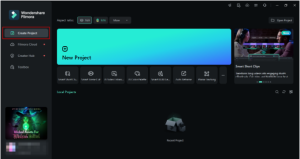
Step 1. Create a New Project
Download and install Wondershare Filmora. Launch it and select “Create Project” from the left panel. Then click the “New Project” button from the main screen.
Step 2. Access the AI Sound Effect Generator
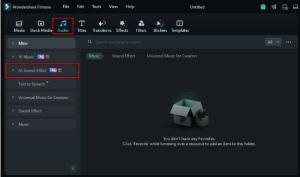
Once you are in the editing interface, select the “Audio” menu from the top toolbar. Then, choose “AI Sound Effect” from the left panel.
Step 3. Write a Sound Description
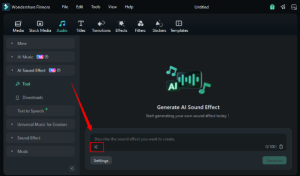
Click the text box and write a description of the sound you want to generate. Alternatively, click the “Shuffle” icon within the prompt box to create a random sound description.
Step 4. Generate the Sound Effects
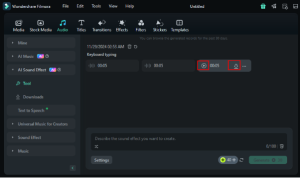
Click the “Settings” button below the text box. Set the sound duration and number of sound effects you want. Then, click the “Generate” button.
Step 5. Preview and Download
Wait for the sounds to generate. Then, click the “Play” button to listen to them. Or, click the “Download” button to save them. You can also drag them to the timeline for further editing.
Keep reading to learn more about Filmora’s sound effect generation capabilities!
Part 2. Advanced Features of Filmora’s AI Sound Effect Generator
Wondershare Filmora is the leading video editing software that uses AI to generate realistic sounds for videos. You can seamlessly access the sound effect generator within Filmora’s editing interface without switching to a separate tool. This makes editing easier. You can generate and sync sounds to the video all under one platform.
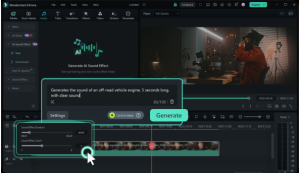
But what makes it different than other tools? Here’s a look at its advanced capabilities.
-
Generate Any Sound Effect
With Filmora’s sound effect generator, you can generate any sound from a text prompt. It can be environmental sounds like rainstorms or wind in the leaves. You can also create musical tones, action-oriented and ambient sounds.
-
Automated Ambient Sounds
The coolest part of Filmora’s AI sound effect generator is the life-like ambient sounds that automatically adapt to your project’s content, vibe, and pacing. This means the generated sounds perfectly match the scene’s tone, eliminating the need for additional editing.
-
Customize Sound Duration
Filmora gives you the freedom to choose the duration of the generated sound. So, if you want to apply a specific sound to a thirty-second clip, you can create a sound precisely this duration!
-
Select the Variety of Sounds
Filmora lets you customize the number of sounds generated from a single prompt. You can generate up to six diverse sounds from the same description. This makes it easier to find exactly the sound you need.
-
Build Sound Libraries
Once you have generated your desired sounds, you can download them and add them to your library. This lets you create extensive custom sound libraries for reuse in future projects.
-
Popular Formats Supported
Filmora’s AI sound effect generator lets you generate audio files in all popular formats. These include formats like MP3, WAV, FLAC, and M4A, removing any compatibility concerns.
-
Adjust Sound Parameters
You can drag and drop the generated sounds to the timeline. Then, you can use Filmora’s audio editing features to enhance, denoise, adjust pitch, and more. This is useful for further customizing the sounds to fit your needs.
Part 3. Tips for Choosing the Best AI Voice Effect Generator
You’ve learned how Filmora’s AI sound generator gives a rich audio experience to your videos! But with so many other AI sound generators out there, it’s easy to feel stuck when choosing the best.
But don’t worry! Here are some pro tips to make the selection easier.
-
Quality of Sound Effects
Does the generator provide realistic, high-quality sound effects? Listen to sample sounds to check if they are natural and realistic. Alternatively, look for a tool that offers a free trial to test it before investing.
-
Customization Features
AI tools may be productive, but they are not perfect. Sometimes, you may need to change the sound’s properties before using it. An AI sound effect generator with options to adjust the pitch, tone, timbre, and clarity of the generated sound can be helpful in such scenarios.
-
Content-Aware Algorithms
Do you want to skip the extensive audio editing to create the perfect sound? If so, content-aware AI tools can be your go-to. They understand the mood of the scenes. Then, they produce a sound that perfectly matches the video’s vibe. It helps remove the need for more adjustments.
-
Speech Generation
Besides the sound effects, you may need to create a sound design with human speech. This could include a logo introduction or voice effects for a gaming tutorial. Check if your desired tool allows speech generation and language and accent support.
-
Tool’s Accessibility
There are standalone tools and seamlessly integrated AI sound effect generators, like Filmora. If you’re a video editor, look for a tool that integrates into your workflows. It can remove the time-consuming hassle of juggling many platforms.
-
Pricing Structure
After finding all the features you need comes the pricing structure! If you’re a hobbyist, a free tool with basic capabilities can do the job. Or, look for a professional tool with pricing plans that fit your budget.
Part 4. Impact on Professional and Amateur Editors
Now that we have covered AI voice effect generators in detail, you might wonder how these tools can affect sound designers. Whether you’re a professional or a hobbyist, these AI tools can benefit you in various ways.
- Save Time on Tedious Tasks: Need a simple rain sound or a more futuristic audio? AI tools can generate professional-quality sound effects in seconds. You don’t need to spend hours recording, searching, or editing.
- Easy Customization: Whether you are a seasoned sound design creator or just getting started, AI tools allow you to get exactly the sound you need. Just tweak your prompt’s description to get an accurate sound down to the last detail.
- Faster Turnarounds: AI sound effect generators can help professional editors complete their projects faster. You can remove the hassle of searching through extensive sound libraries and get the ideal sound with just a click.
- Endless Creativity: Creativity is unlimited, with instant access to any sound effect. You can create sounds that are hard to produce manually and without technical skills.
- Low Learning Curve: AI tools are beginner-friendly. You can create professional-grade sound designs in seconds without complex equipment.
- Affordable and Accessible: AI voice effect generators are excellent for small businesses. They’re cheaper than specialized sound editing software and allow extensive sound generation in no time!
That’s all about the AI sound effect generation! Now, let’s review some questions you may have before calling it a wrap-up!
FAQs on AI Sound Effect Generator
Q1. What are AI tools to generate sound effects from text?
Among the tools that allow sound generation from text are AudioLDM and Soundraw. These are dedicated to sound generation using text prompts. If you need an AI sound effect generator from text with video editing features, Wondershare Filmora is the ideal option.
Q2. What types of sounds can an AI sound generator create?
AI sound generators allow you to create sound from a specific text description. You can generate environmental, ambient, sci-fi, musical tones, and more. You can develop a realistic human voice with different emotional tones if the generator supports speech synthesis.
Q3. Are there any copyright issues with AI-generated sound effects?
AI-generated sound effects from reputable tools like Filmora are royalty-free. This means you can use them in commercial projects without extra licensing fees. But, review the tool’s license and terms of use before using the sounds.
Conclusion
So, there you have it—a complete guide to an AI sound effect generator and how it works! Using Wondershare Filmora’s sound generation capabilities, we have explored the technology behind this tool and its main functionalities.
With Filmora’s sound effect generator, you can create sound effects that perfectly match your video’s vibe. From the subtle sound of a heartbeat to a powerful gunshot or ambient sounds, Filmora handles them all. With its fast text-to-sound generation capabilities, anyone can create professional-grade sound designs effortlessly.
