

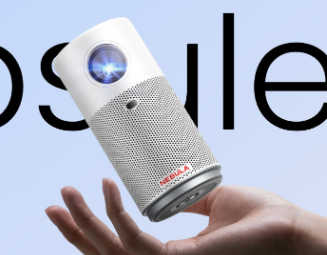
Choosing the right HD projector can transform your viewing experience, whether for home theater, office presentations, or gaming. Understanding what to look for is crucial to match the projector to your specific needs. This guide will help you navigate the key features, compare top brands, and consider your unique space requirements. We’ll explore essential aspects like resolution, brightness, connectivity, and more. By the end, you’ll be equipped with the knowledge to make an informed decision and enjoy crystal-clear visuals. Let’s dive into the world of HD projectors and uncover what makes them stand out.

Key Features to Consider When Choosing an HD Projector
Resolution and Image Quality
Resolution is a critical factor in choosing an hd projector. Higher resolutions, such as 1080p or 4K, offer sharper and more detailed images, ideal for movies and gaming. Look for projectors with high pixel counts to ensure vivid picture quality. The Nebula Cosmos 4K SE, for instance, provides 4K UHD resolution, delivering an immersive cinematic experience. Additionally, consider the image processing technology, as it enhances color accuracy and reduces motion blur. A projector with good resolution and image quality ensures a clear and enjoyable viewing experience.
Brightness and Contrast Ratio
Brightness, measured in ANSI lumens, determines how well the projector performs in various lighting conditions. For home theaters, a projector with at least 1500 lumens is recommended, while brighter rooms may require 3000 lumens or more. The contrast ratio, the difference between the darkest and brightest parts of the image, is equally important. Higher contrast ratios produce deeper blacks and more vibrant colors. The Nebula Cosmos Laser 4K offers 2200 ANSI lumens and impressive contrast, making it suitable for well-lit environments and ensuring high-quality visuals.
Connectivity Options
Modern HD projectors come with various connectivity options, including HDMI, USB, and wireless capabilities. HDMI ports are essential for connecting devices like Blu-ray players, gaming consoles, and laptops. USB ports allow for direct playback of media files. Wireless connectivity, such as Bluetooth and Wi-Fi, enables seamless streaming from smartphones and tablets. The Nebula Capsule 3 Laser, for example, supports Android TV and offers multiple connection options, making it versatile for different usage scenarios. Ensure the projector you choose has the necessary ports and wireless features to suit your setup.
Matching the Projector to Your Space and Use
Room Size and Throw Distance
The size of your room and the throw distance, the distance between the projector and the screen, are crucial factors. Short-throw projectors are ideal for smaller spaces, as they can produce large images from a short distance. For larger rooms, long-throw projectors are better suited. Measure your room and check the projector’s throw ratio to ensure it can project the desired screen size without compromising image quality. The Nebula Cosmos Laser 4K, with its adjustable throw distance, is versatile for different room sizes.
Installation and Mounting Options
Consider how and where you will install your projector. Ceiling mounts save space and provide a permanent setup, while portable projectors offer flexibility. Ensure the projector has features like auto-focus and keystone correction for easy installation and alignment. The Nebula Capsule Air, with its compact design and easy setup, is perfect for both fixed and portable installations. Whether you prefer a permanent home theater setup or a projector that can be moved from room to room, choose a model that suits your installation preferences.
Ambient Light Considerations
Ambient light can significantly affect the projector’s performance. In bright rooms, a projector with higher lumens is necessary to ensure clear images. Conversely, in a dark home theater, lower lumens are sufficient. The Nebula Cosmos 4K SE, with its 1800 ANSI lumens, performs well in various lighting conditions, providing clear and vibrant visuals. Additionally, consider using blackout curtains or an ALR (ambient light rejecting) screen to enhance image quality in well-lit environments. Properly addressing ambient light ensures you get the best viewing experience regardless of room lighting.
Home Theater vs. Portable Projectors
Decide between a home theater projector and a portable one based on your usage needs. Home theater projectors, like the Nebula Cosmos Laser 4K, offer superior image quality and features for a cinematic experience. They are ideal for dedicated home theaters. Portable projectors, such as the Nebula Capsule 3 Laser, provide convenience and flexibility, making them suitable for on-the-go entertainment. They are compact, lightweight, and easy to set up, perfect for outdoor movie nights or travel. Consider your usage scenarios to choose the right type of projector.
Comparing HD Projector Brands and Models
When comparing HD projector brands and models, it’s essential to look at their unique features and specifications. Popular brands like Nebula offer a range of options catering to different needs. The Nebula Capsule Air is known for its portability and ease of use, with features like 150 ANSI lumens brightness and a built-in battery. On the other hand, the Nebula Cosmos 4K SE provides 4K UHD resolution and advanced image processing for a premium viewing experience. Evaluating the features and specifications of each model helps in making an informed decision.

Conclusion
Choosing the best HD projector involves considering various factors such as resolution, brightness, connectivity, and space requirements. Understanding your specific needs and preferences is crucial in making the right decision. Brands like Nebula offer a range of projectors with innovative features and high performance, ensuring a satisfying viewing experience. Whether you need a projector for a dedicated home theater or portable use, the right model can enhance your entertainment setup. Use this guide to navigate the options and select the best HD projector for your needs, ensuring clear and vibrant visuals for all your viewing pleasures.
FAQ
What is the ideal resolution for an HD projector?
The ideal resolution for an HD projector depends on your usage needs. For general use, 1080p resolution is sufficient and provides clear, detailed images. For a more immersive viewing experience, especially for movies and gaming, 4K resolution is recommended. Projectors like the Nebula Cosmos 4K SE offer 4K UHD resolution, delivering sharp and vibrant visuals that enhance your viewing experience.
How much brightness is needed for a home projector?
The brightness required for a home projector depends on the ambient light in your room. For dark home theaters, 1500 to 2000 ANSI lumens are sufficient. In brighter rooms, consider projectors with 3000 ANSI lumens or more. The Nebula Cosmos Laser 4K, with 2200 ANSI lumens, is versatile and performs well in various lighting conditions, ensuring clear and vibrant images even in well-lit environments.
Can I connect an HD projector to my smartphone?
Yes, you can connect an HD projector to your smartphone using various methods. Many modern projectors, like the Nebula Capsule 3 Laser, offer wireless connectivity options such as Bluetooth and Wi-Fi. Additionally, you can use HDMI adapters or USB cables to establish a direct connection. This flexibility allows for seamless streaming and sharing of content from your smartphone to the projector.
