


Clear communication during phone calls is essential, whether you’re discussing important business matters, catching up with friends, or coordinating family plans. Unfortunately, various factors can compromise call quality, leading to frustrating experiences with dropped calls, poor audio clarity, and background noise. Understanding how to optimize your phone settings, improve your physical environment, and leverage advanced features can significantly enhance your call experience. This guide will provide you with practical tips and solutions to ensure your mobile calls are as clear and reliable as possible.
Optimize Your Phone Settings
A strong network connection and up-to-date phone software are essential for clear phone calls. Weak or fluctuating signals can cause interruptions or distortions, so check your signal strength by looking at the signal bars or accessing network settings. If the signal is poor, move to a location with better coverage, avoiding areas with heavy interference from buildings or electronic devices. For persistent issues, contact your service provider. Additionally, keeping your phone’s software updated is crucial for optimal performance and security. Updates fix bugs, improve functionality, and enhance call quality. To update, go to ‘Settings,’ select ‘System,’ and choose ‘Software Update,’ then follow the instructions to install any available updates. Regular updates ensure your phone operates efficiently with the latest enhancements.
Improve Your Physical Environment
Minimizing background noise and using noise-canceling accessories are essential for improving call clarity. For example, if you’re on a call from a busy coffee shop, background noise can disrupt the conversation. To address this, find a quieter spot or use noise-canceling technology. Investing in high-quality headsets, like the Bose QuietComfort earbuds, can make a significant difference. These earbuds are known for their effective noise-canceling features, filtering out external sounds and ensuring you hear and are heard more clearly. By choosing well-reviewed accessories with adjustable noise-canceling levels, you can adapt to various environments, enhancing the quality of your calls.
Troubleshoot Common Issues
Addressing Echo and Feedback
Echo and feedback during calls can be distracting and diminish the overall quality of the conversation. Echo often occurs when there is a delay in the audio, causing you to hear your own voice repeated. Feedback might result from audio levels being too high or poor microphone placement. To address these issues, adjust the volume settings and ensure that your phone’s microphone and speaker are not obstructed. Using a headset can also help reduce echo and feedback by keeping the microphone close to your mouth and minimizing sound leakage.
Resolving Call Drop Problems
Call drops can be frustrating, especially during important conversations. Several factors can contribute to dropped calls, including network congestion, weak signals, or software glitches. To minimize call drops, ensure you’re in an area with strong network coverage and avoid switching between networks during calls. Restarting your phone can also help clear temporary issues affecting call stability. If call drops continue, check with your service provider for any ongoing network issues or service disruptions.
Utilize Advanced Features
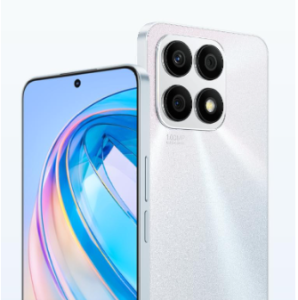
To improve your calling experience, utilize Voice over LTE (VoLTE), a feature that enhances call quality by using LTE networks instead of traditional 3G or 2G networks. VoLTE provides clearer audio, faster call setup times, and improved connectivity. To enable VoLTE, go to your phone’s settings, navigate to ‘Mobile Network’ or ‘Cellular Network,’ and toggle on the VoLTE option. Most modern smartphones support VoLTE, which can significantly enhance call clarity. Additionally, leverage built-in call quality enhancements available on many smartphones. Features like call clarity settings, noise reduction, and volume adjustments can be accessed through your phone’s settings or call options. For instance, the HONOR X8a includes an ‘Extra Volume Mode’ that can be activated by pressing the + button at maximum volume, ensuring clear phone calls even in noisy environments. Together, these features form a comprehensive toolkit for optimizing your calling experience.
Conclusion
Ensuring clear mobile calls involves a combination of optimizing your phone settings, improving your environment, and utilizing advanced features. By checking your network connection, updating your phone software, and minimizing background noise, you can enhance call clarity and reliability. Incorporating noise-canceling accessories and addressing common issues like echo and call drops will further improve your experience. Advanced features such as VoLTE and the HONOR X8a’s ‘Extra Volume Mode’ offer additional benefits, ensuring that your calls remain clear even in challenging conditions. Implementing these tips will help you maintain effective communication and enjoy a better calling experience.
