


An OCR software is very helpful in converting scanned documents or images into editable text. It saves you from manually typing the whole thing, making it very efficient and productive. However, when it comes to picking the right tool, people find many difficulties like not getting all the features they need in one tool, limited free or paid plans, experience and performance issues, etc.
So, in this article we will review and compare the 5 best software you can use for performing OCR with high efficiency.
Part 1. 5 Best OCR Software
Here is our take on the 5 best software you can use for meeting your OCR needs.
1. UPDF – OCR Software on Windows and Mac
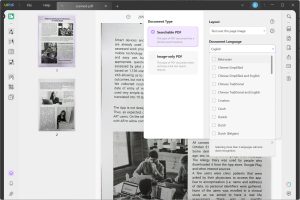
The best software that you can use for performing OCR on your documents is UPDF. UPDF is a complete PDF editing suite with OCR. When using the OCR feature, you get lots of different modes and configurations to use for layout settings, language settings, and text over the image. For instance, you can perform OCR with one of the following modes:
- Text and picture only
- Text over page image
- Text under page image
Moreover, it can work in reverse mode by converting searchable and editable PDFs into non-editable PDFs. UPDF allows you to work on documents in 38 different languages and provides over 99% accuracy while retaining content and formatting integrity.
With the OCR features offered here, you can convert scanned PDFs and images into editable formats and then using UPDF’s editing features, those can be easily edited. In fact, you can use UPDF AI features like summarize, translate, rewrite, etc on scanned PDF or images after performing OCR. Download UPDF to enjoy all these features right now.
UPDF not only brings OCR features but also has a wide range of other features. Some of the key features offered by UPDF include:
- Annotations with multiple freehand and prebuilt tools
- UPDF AI that lets you write, rewrite, review, summarize, and translate content directly in PDF
- UPDF Cloud that stores all your PDF documents and syncs them across devices with your account
- PDF Form filling, creating, editing, and signing
- Organize PDF documents and merge + split features
- Protect your PDF documents by adding open-password and permission-password
- Edit PDF documents with complete control over text, links, and images
- Batch Process PDF files for quickly implementing the same thing on multiple files
- Compress PDFs without reducing quality to reduce their size
- Convert PDFs to other formats and other format files to PDF easily
- Read PDF aloud for an audiobook-like experience
Learn more about UPDF: Watch this UPDF video review.
2. Abbyy
ABBYY FineReader is an advanced OCR (Optical Character Recognition) tool that converts digital photos and scanned documents into formats that can be edited and searched. ABBYY FineReader serves a worldwide user base by properly processing documents in over 200 languages thanks to its strong OCR capabilities.
Professionals that need to convert and modify a variety of documents will find the application helpful since it maintains original formatting and layouts. It facilitates quick content searches and effective document management which optimizes document processes. The OCR technology from ABBYY also makes digitizing archives easier by turning them into digital data that can be used for action which improves accessibility and efficiency in commercial settings.
3. Tesseract OCR Software
Tesseract is a well-known open-source optical character recognition (OCR) engine that is highly famous for its accuracy and versatility in transforming text pictures that are printed handwritten or typed into machine-encoded text. HP first created it and is now maintained by Google. Supporting more than 100 languages it is an adaptable option for people worldwide.
Tesseract provides features like script recognition and layout analysis that may be used into a variety of applications. Developers and companies in need of a reliable OCR solution for data input archiving and document automation will find it suitable. Its capacity to handle many document formats broadens its use in converting scanned documents into searchable texts improving the accessibility and retrieval of data.
4. Convertio OCR – Online OCR Software
Convertio OCR allows users to easily convert scanned documents and photos into editable and searchable text forms using optical character recognition technology. Convertio OCR caters to a wide range of international users by supporting more than 100 languages. It works with any web browser and doesn’t need the installation of any software.
Easy file uploading with excellent OCR conversions and downloads of the editable output in Word Excel and plain text formats make it an amazing choice. The cloud-based platform from Convertio OCR offers a handy option for individuals and enterprises wishing to improve their document digitalization operations while also guaranteeing data protection on the go.
5. iLovePDF OCR – Online OCR Software
iLovePDF OCR is a feature-rich online PDF tool that specializes in turning scanned PDFs and photos into editable and searchable documents with its OCR feature. With support for more than 100 languages, it serves almost everyone in the world. With the use of this online tool, users may convert non-selectable text into a digital version that can be modified, formatted, and indexed.
Its user-friendly interface guarantees a smooth document conversion and processing procedure for maximum efficiency while maintaining high accuracy with every conversion and every language makes it a widely acceptable choice.
Part 2. Which OCR Software is Better?
Out of the 5 options we discussed above, each one offers amazing features and poses great competition for others. So, as a user it gets very difficult to select one just by taking a look at the overview of these tools. That’s why we have included this comparison table that can help you compare and easily decide which tool offers you the best value.
| Items | UPDF | ABBYY | Tesseract | Convertio OCR | iLovePDF OCR |
| Price | -UPDF Pro (Yearly plan) $ 35.99
-UPDF Pro (Perpetual plan) $ 55.99
-UPDF Pro + AI (Yearly plan) $ 65.99
-UPDF Pro (Perpetual) + AI (Yearly) $ 83.99
-UPDF AI (Monthly) $ 9
-UPDF AI (Yearly) $ 59.99 |
-Month 16€
-Year 99€ |
-Basic monthly $9.99
Professional monthly $19.99
-Enterprise monthly $49.99
|
-Free
-50 Pages for $4.99 (Cheapest)
-5000 Pages for $399.99 (Best Value) |
-Free
-Premium Monthly $7
-Premium Yearly $48 |
| Customer Rating (G2) | 4.5 | 4.8 | 4.4 | 4.8 | 4.6 |
| OCR PDF | Yes | Yes | Yes | Yes | Yes |
| Customize OCR Settings | Yes | No | No | Yes | No |
| Languages Supported | 38 and will add more | 200+ | 100+ | 100+ | 100+ |
| Make PDF Non-editable with OCR | Yes | No | No | No | No |
| Translate Scanned/Image PDF | Yes | No | No | No | No |
| Convert Scanned/Image PDF | Yes | Yes | Yes | Yes | Yes |
| Write PDF | Yes | No | No | No | No |
| Rewrite PDF | Yes | No | No | No | No |
| Chat for PDF | Yes | No | No | No | No |
While many qualities and features overlap among these tools, UPDF is the one that offers the best value. It is not only competitive in terms of the features offered but also brings great value for money with cheaper prices and multiple packages offered.
Part 3. FAQS About OCR Software
Q1. What Is OCR Software?
OCR software digitizes text from physical documents or picture files, allowing it to be modified, searched, and stored digitally. In simpler words, it is a tool that you can give a scanned document or an image containing text and it will provide you with editable text from that file which you can save or modify as you want.
Q2. Which is the Best Open-Source OCR Software?’
Tesseract OCR is the best open-source OCR software. It is well-known for its adaptability, multilingual support, and active community development.
Q3. Which is The Best Linux OCR Software?
Tesseract OCR is regarded as the finest for Linux because of its high accuracy, comprehensive language support, and interoperability with a variety of front-end interfaces that expand its functionality.
Q4. Which is the Best OCR Software for Windows 10?
UPDF is one of the best OCR software for Windows 10, with a user-friendly interface, high-quality OCR conversion in multiple languages and up to 99% accuracy. It also offers extensive editing options, UPDF AI features and several other features for working on PDFs.
Conclusion
In older times if you had a physical copy of some text, scanned file or image of a text and you wanted to edit that text then you had to type it all again manually. However, with the advancements in OCR software technology this has become a problem of the past. Now there is no need to manually type something since OCR software can convert it into editable text for you within seconds.
UPDF is the best OCR tool among all the options we discussed here. It brings OCR features for everyone and packs many other features including PDF editing and UPDF AI that make our lives much simpler. Download UPDF and purchase its Pro version to unlock all premium features like OCR and more.
